

10 Expert Tips That Actually Work
Infographics aren’t decoration. They’re compression. A strong infographic takes complexity — research, data, insight — and makes it immediately clear.
Done well, it:
- Improves engagement
- Increases retention
- Clarifies technical or scientific topics
- Strengthens brand recognition
Done badly, it looks like a crowded noticeboard. Here’s how to get it right.
What Is an Infographic?
An infographic is a visual storytelling format that combines data, design and concise copy to communicate complex information quickly.
It is not a long-form report.
It is not a poster filled with paragraphs.
It is structured clarity.
In sectors like life sciences, finance or technology — where complexity is unavoidable — infographics help translate expertise into understanding.
The 10 Best Practices for Creating a Successful Infographic
1. Start With a Clear Message
Before opening any design software, answer one question: What is the single takeaway?
An effective infographic communicates one core idea — not ten loosely connected ones.
If you cannot summarise it in one sentence, it is not ready.
2. Design for Visual Hierarchy
Infographics are scanned, not read.
Your layout should guide the eye deliberately — from headline to supporting insight to conclusion.
Use:
- Size variation
- Spacing
- Weight contrast
- Alignment
Hierarchy is what turns information into understanding.
3. Stay Ruthlessly On Brand
Your infographic should feel unmistakably yours. Not like a template.
That means:
- Brand colours
- Brand typography
- Brand tone of voice
- Consistent icon style
If your logo disappeared, the design should still be recognisable.

4. Simplify the Data
An infographic is not a data archive.
Remove:
- Redundant statistics
- Overly complex charts
- Unnecessary decimals
Highlight what matters most.
When everything is emphasised, nothing stands out.
5. Source Everything
Credibility is visible.
Include:
- Clear data sources
- Research references
- Publication dates
Inaccurate or unsourced information undermines trust — especially in data-driven industries.
6. Keep Copy Tight
Infographics deliver fast information.
Use:
- Short headlines
- Clear phrasing
- Active verbs
Avoid:
- Long paragraphs
- Passive language
- Marketing clichés
Precision matters more than volume.
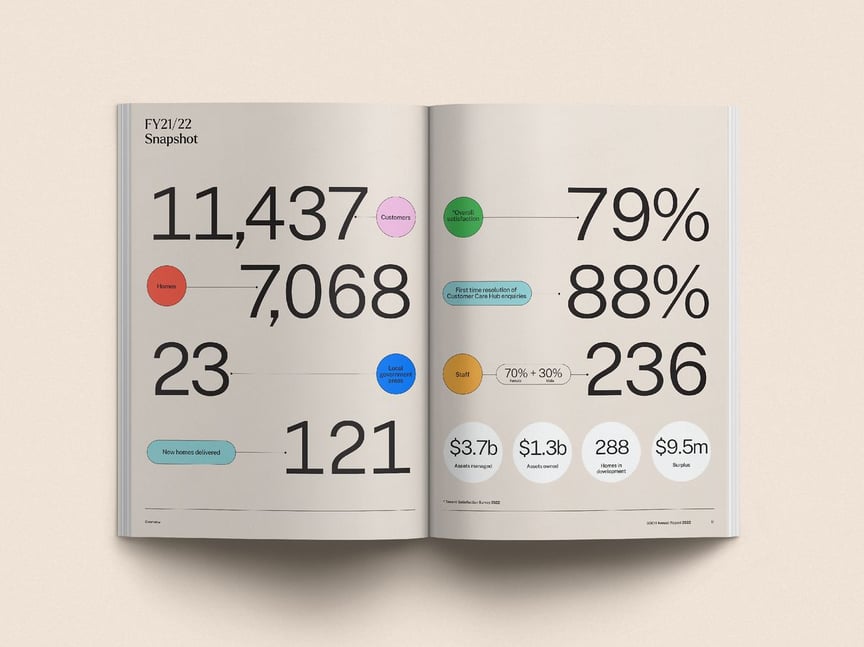
7. Use Numbers as Visual Anchors
Numbers create structure and rhythm.
-
Enlarge key statistics.
-
Adjust weight.
-
Let data become the design itself.
-
Strong infographics often revolve around three to five hero metrics that carry the narrative.
8. Limit Your Colour Palette
More colour does not create more impact.
Choose:
- One primary colour
- One accent colour
- Neutral support tones
Consistency strengthens recognition — and trust.
9. Choose Typography Strategically
-
Typography communicates intent.
-
Bold type signals authority.
-
Light type feels refined.
-
Rounded type appears approachable.
-
Use one or two fonts. No more.
Discipline improves design.
10. Design for Distribution
Where will this infographic live?
- Website
- Presentation deck
Format, resolution and orientation should reflect that context.
A beautifully designed infographic that fails on mobile loses its value.
Common Infographic Mistakes to Avoid
- Too much text
- Too many icons
- Inconsistent spacing
- Unclear data source
- No defined takeaway
If it feels busy, it probably is.
Why Infographics Still Work in 2026
Attention hasn’t shortened. It has sharpened.
Audiences don’t want less information. They want faster clarity.
Infographics, when strategically designed, deliver that.
When data, design and narrative align, an infographic becomes more than visual content. It becomes a decision-making tool.
Frequently Asked Questions About Infographics
What makes an infographic effective?
A clear single message, strong visual hierarchy, accurate sourced data, and brand consistency.
How long should an infographic be?
As long as it needs to communicate one focused idea clearly, and no longer.
What tools can you use to create an infographic?
Professional design software such as Adobe Illustrator is ideal, but platforms like Canva or Piktochart can work if customised carefully to match your brand.
Final Thought
An infographic is not about making data attractive. It is about making insight unmistakable. When clarity leads, confidence follows.